
Get customers to message you on WhatsApp
On WhatsApp, a customer can start a conversation with you, or you can start one with a customer who has given you permission. This page explains both and what the policy requires. It covers your WhatsApp channel once it is running.
How conversations start
Section titled “How conversations start”Customer first. Customers can write to your number whenever they like. They only need your number or a Click to Chat link. You can reply freely while the customer service window is open (see WhatsApp Business policy).
Business first. You can start a conversation if you have the customer’s phone number and their opt-in. Outside the customer service window you can only send approved message templates. Once the customer replies, you can send normal messages again. Bots only reply to customers: to send templates yourself, use the Messaging API.
Customer first is not opt-in. If a customer contacts you for support, you can always answer, but you still need an opt-in collected elsewhere before you send them notifications with template messages.
Ways to make it easy for customers to start:
- Put your WhatsApp number or a Click to Chat link on your website, in emails, on receipts and in printed material.
- Show a QR code that opens the chat, for example in a shop or on packaging.
- Run Click to WhatsApp ads on Facebook and Instagram. Set these up in Meta’s ads tools.
Collect opt-in
Section titled “Collect opt-in”Unless the customer writes to you first, you need their explicit consent before you message them. Collect it through a channel other than WhatsApp: your website or app, SMS, email, or in a shop. Even if a customer first contacted you for support, you need an opt-in to send them messages after the 24-hour window.
Ask for WhatsApp consent only. Don’t combine it with other channels, for example one checkbox for “WhatsApp and SMS”.
Word the opt-in like this, with the official WhatsApp logo:
Receive subject on WhatsApp logo
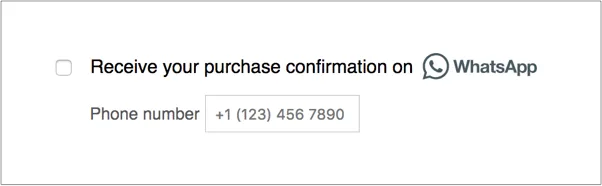
where subject says what kind of messages the customer will get. The form must:
- let the customer edit their phone number,
- show the opt-in text next to the form fields,
- state clearly what the customer consents to,
- need an action from the customer, such as entering a number or ticking a box.
WhatsApp regularly checks businesses’ opt-in flows and uses internal quality metrics to decide whom to check.
WhatsApp Business policy
Section titled “WhatsApp Business policy”Every business that uses WhatsApp through Amio must read the full WhatsApp Business Policy. The two points that matter most day to day:
- Customer service window. After a customer messages you, you can reply with free-form messages for 24 hours from their last message. After that you can only send approved message templates.
- Opt-in. You need permission in context, during the flow where the customer does something related to the message. For example, to send a receipt on WhatsApp, ask during the purchase. Consent collected with no link to what the customer is doing doesn’t comply.
For what Meta charges per message, see Meta’s WhatsApp pricing. Pricing changes, so Amio docs don’t list prices.