
Chat Themes
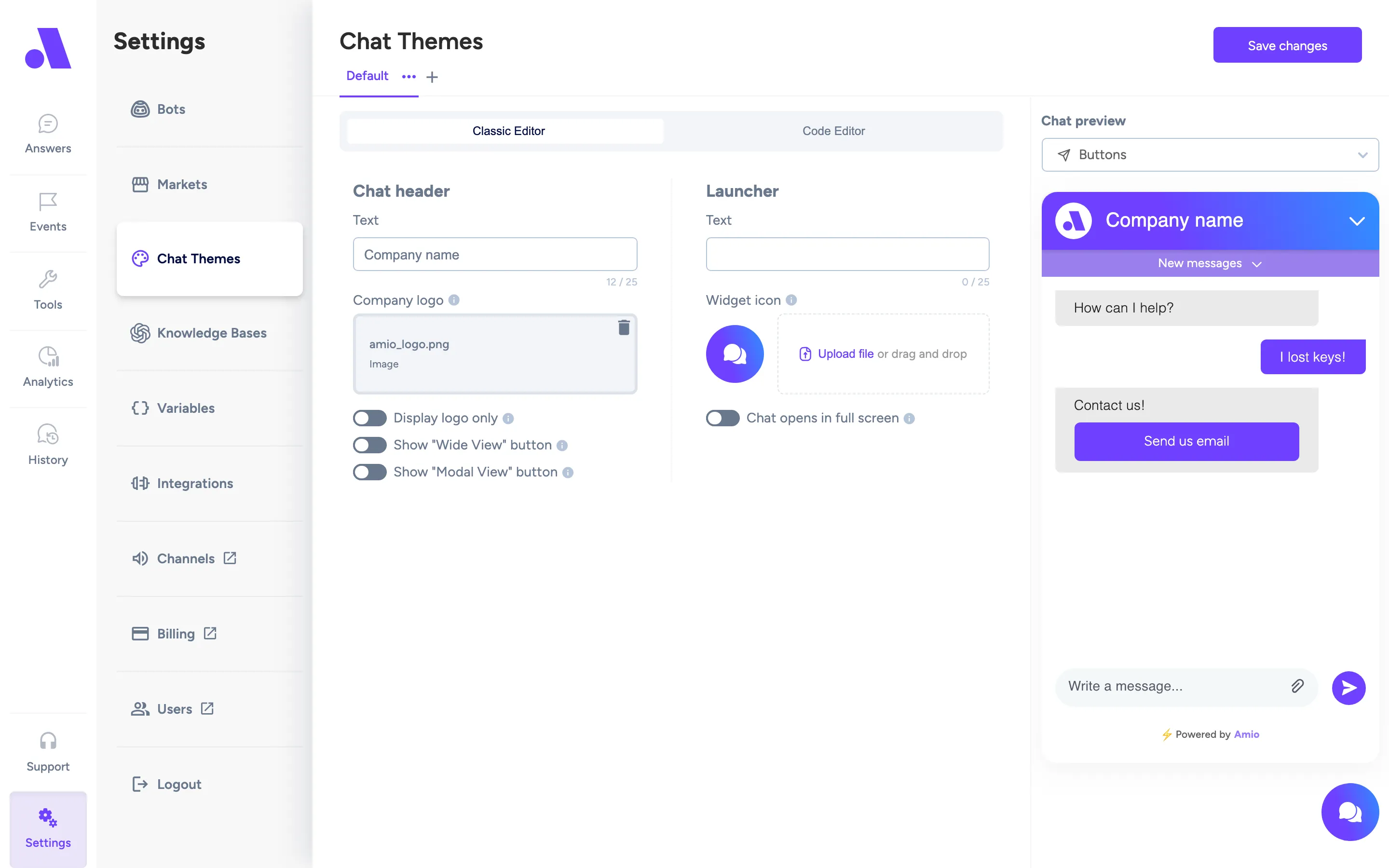
Chat Themes (under Settings, at /settings/themes) controls how the webchat widget looks. Each theme is a tab. You assign a theme to a bot in the bot’s settings.
What you can do here
Section titled “What you can do here”- Edit a theme in the Classic Editor (form) or the Code Editor (JSON).
- Check the result in the live preview. Use the preview selector to switch between Buttons, Quick replies, Carousel, File attachment and Client input.
- Create, rename and delete themes.
- Copy a demo chat URL to see the theme in a real chat.
Add a theme:
- Click the plus button next to the last theme tab.
- Type a theme name and confirm.
- Change the settings and click the save button at the top right.
Rename or delete a theme: open the menu on the active tab and choose Rename or Delete. Delete asks you to type the theme name to confirm and cannot be undone. The Delete option is hidden while you have only one theme.
Apply a theme to a bot: open the bot’s settings, pick the theme in the Theme field and click Deploy chat. Saved themes are loaded when the chat connects, so you do not need to change your embed script.
Fields
Section titled “Fields”The Classic Editor covers the main settings. The Code Editor edits the full theme JSON, which also holds message bubble, message list, sent/received message, button and quick reply colours and sizes.
| Field | What it does |
|---|---|
| Chat header: Text | The title shown in the widget header. |
| Chat header: Company logo | Your logo in the header. Add a PNG, JPG, or GIF under 150KB. Images with transparent backgrounds work best. |
| Display logo only | By default the header shows the logo with text. Turn on to show the logo only. |
| Show “Wide View” button | Adds a header button that expands the widget into a wider layout. |
| Show “Modal View” button | Adds a header button that opens the chat in a wider layout, centred on the screen. |
| Launcher: Text | The text on the launcher button that opens the chat. |
| Launcher: Widget icon | The icon on the launcher. Same image rules as the logo. |
| Chat opens in full screen | When the chat opens, it covers the entire screen. |
| Classic Editor / Code Editor | Switches between the form and the raw JSON. Save is disabled while the JSON is invalid. |