
Webchat
Webchat is the chat window on your website. You create an Amio Chat channel, pick a theme, deploy, and paste a snippet into your site.
Prerequisites
Section titled “Prerequisites”- A chat bot.
- Access to the code or tag manager of the website where the chat should appear.
Steps in the admin
Section titled “Steps in the admin”- Open Bots and select your bot.
- Choose Add channel and stay on the Create tab.
- Enter a Name and set Type to Amio Chat.
- Under Chat settings, choose a theme and, if you want, override the texts.
- Select Create.
- Open the new channel and select Deploy chat. The install snippets appear.
- Add the snippets to your website. See Install the chat on your website.
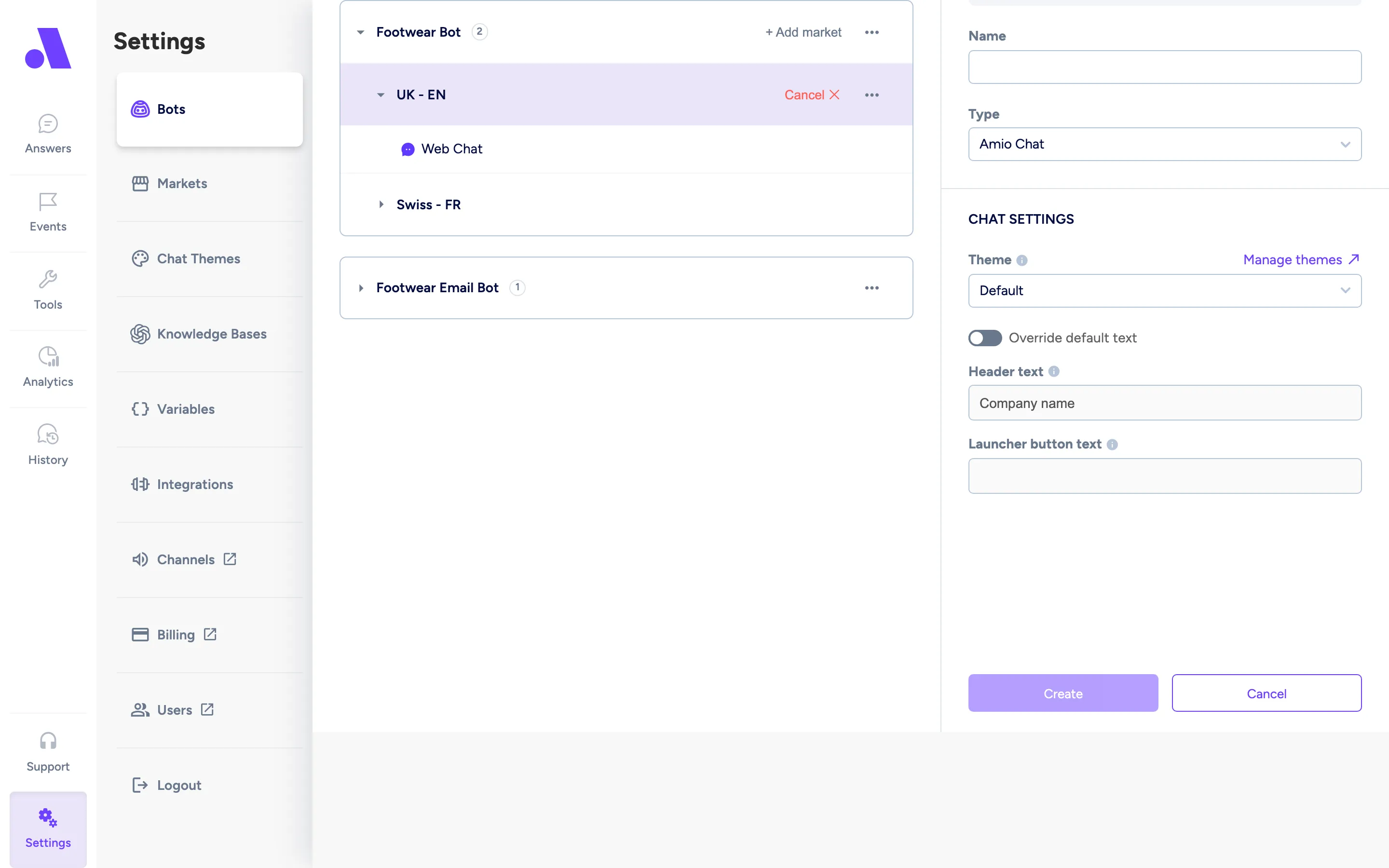
To use a channel that already exists, open the Deploy tab instead and select it. Deploying an existing Amio Chat channel applies this market’s chat theme to it and replaces the channel’s current widget appearance.
Configuration fields
Section titled “Configuration fields”| Field | Required | What it does |
|---|---|---|
| Name | Yes | Name of the channel in the admin. |
| Type | Yes | Amio Chat for webchat. |
| Theme | No | Colors and look of the chat window. New channels start from the bot’s theme or the first available one. |
| Text override | No | Replaces the theme’s default texts for this channel. |